
Search and filter are topic specific. Text search and filter options are specific to each topic and do not work across topics. For example, searching for “Mortality rates” in the Price topic will not return any results since mortality rates are included only in the Nutrition topic.
Search
When performing a search, results appear ordered by relevance. You can refine your search using operators such as single or double quotation marks, the word or, or a minus sign.
The table below contains examples of how to use these search operators.
|
Search |
Results |
|---|---|
|
vegetable oil |
results that contain those words in any order |
|
“vegetable oil” |
only results that include that exact phrase |
|
“sunflower oil” “palm oil” |
only results containing both phrases |
|
“sunflower oil” or “palm oil” |
results that contain either phrase |
|
‘vegetable oil’ -‘palm oil’ |
results about vegetable oil unless they include the phrase ‘palm oil’ |
Depending on the topic, you may be able to search by:
-
Country: Country name or ISO 3166 code
-
Scenario: The name of a scenario, i.e., Current Situation, Near Term Projection, or Medium Term Projection
-
Geographic Unit Set: The name of any Geographic Unit Set, which is a set of geographic units that represent a specific hierarchy, for example the official government administrative hierarchy for a country.
-
Data Source Document: Name and organization
-
Data Series: Name, description, and metadata
Filter
Learn more about specific filters on the Filter Descriptions page.
Filters can be used in two ways:
-
Begin typing a term in the filter box to narrow the possible options.
-
Click on the filter box to browse a list of possible options.
Once you have found a relevant filter, through browsing or searching, click the box next to the filter name to use the filter on the available data.
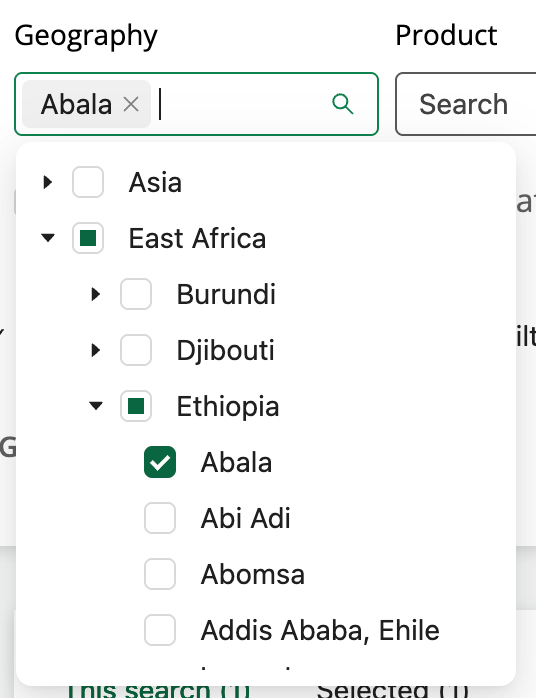
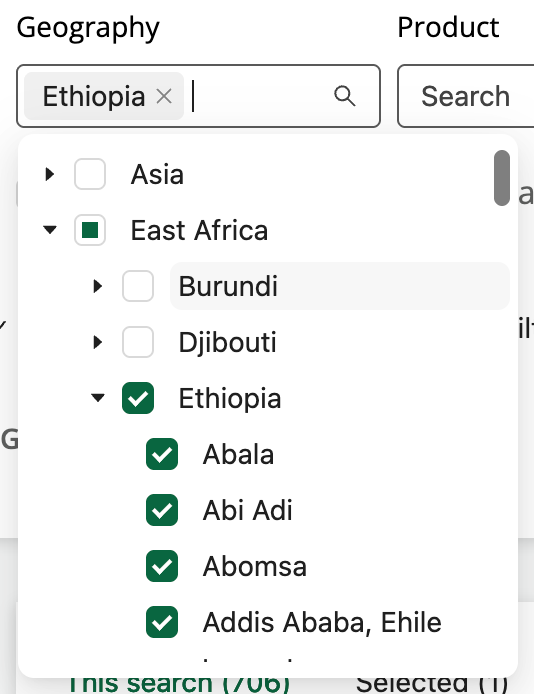
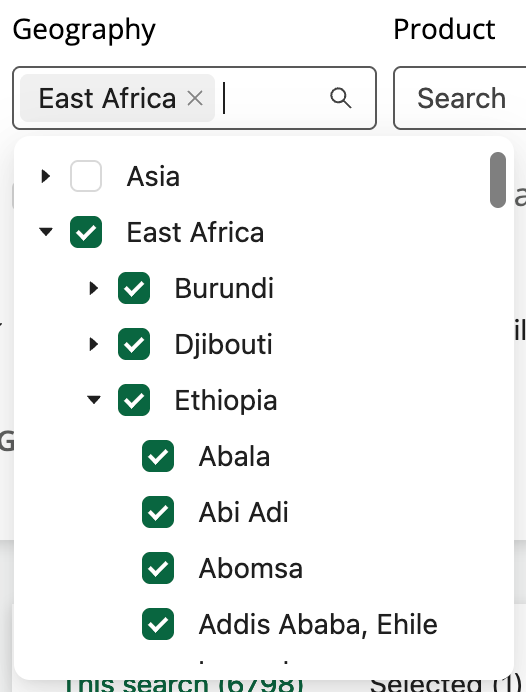
Some filters aggregate items into multi-level lists (e.g., countries being aggregated into continents or sub-continents as shown in the image below). In these cases, selecting the higher-level item in the list will automatically select all the lower-level items in the list, as illustrated below.
Data Series with no Data Points
Check the Include Data Series with zero Data Points box to include Data Series in your search that do not yet have data uploaded to the FEWS NET Data Platform.
View selected filters
The Selected Filters section allows you to view all selected filters at once and remove filters more easily (0:29, no audio):
Reset search
You can remove all your search and filter selections at any time using the Reset search button (0:011, no audio):
How to video: search tips and strategies
Watch the below video to learn more about using search terms and filters, as well as modifying and reseting your search criteria (4:01, includes closed captions).