
Data Warehouse Knowledge Base
Breadcrumbs

Troubleshooting Data Uploads

Failed uploads to the FEWS NET Data Warehouse (FDW) typically result from errors in the column headings, metadata, or data values in the source file. This page provides examples of upload errors across domains. For information about domain-specific upload requirements, see Domain Specific Data Management.

Data upload checklist

Use the following checklist when troubleshooting data uploads:

Check column headings:

  • Column headings have correctly spelled metadata fields.

  • Column headings contain metadata fields recognized by FDW.

  • There is a column heading for each column that contains data.

Check metadata:

  • All metadata values match those available in FDW.

  • Compatible metadata values are used for each record.

  • Metadata values are free of extra characters or values that cannot be recognized.

Check data values:

  • Data values align with the correct metadata field in the column headings.

  • Data values are within an expected range.

Column heading errors

The examples below describe common errors related to column headings:

Example 1: Incorrect Column Heading

Scenario: Uploading price data using the import screen (https://fdw.fews.net/en/admin/price/marketprice/import/) results in the following error message:

‘country’ is not in list

Explanation: The country column heading is missing or spelled incorrectly in the source file.

Solution: Ensure the source file contains the corrected column heading.

Example 2: Mismatched or Blank Column Heading

Scenario: Uploading price data from the import screen (https://fdw.fews.net/en/admin/price/marketprice/import/) results in the following error message:

['Cannot identify a DataCollectionPeriod for every row.']  

Explanation: The error indicates a mismatch in the column headings contained in the file and those recognized by FDW. For example, the data_source_document name or data_source_organization name in the file do not align with those in FDW. This error may also indicate that the file contains a blank column heading.

Solution: Ensure all column headings are titled correctly and there are no blank headings.

Metadata errors

Metadata values must be recognized by FDW. New metadata should be added through the Data Series or metadata importing screen.

The examples below describe common errors related to metadata:

Example 1: Invalid CPI Metadata Values

Scenario: Uploading CPI data (https://fdw.fews.net/en/admin/price/priceindexvalue/import/) results in 1 skipped result.

Explanation: The metadata values for the columns (such as the index_name or geographic_unit) do not match those in FDW.

Solution: Correct the metadata values to match those in FDW.

Example 2: Invalid Exchange Rate Metadata Values

Scenario: Uploading exchange rate data from the import screen (https://fdw.fews.net/en/admin/price/exchangeratevalue/import/) results in the following error message:

· Cannot identify Data Series for row {'datapoint_status': 'Collected', 'dataseries': None, 'market': None, 'datasourcedocument': <DataSourceDocument: FEWS NET, Democratic Republic of the Congo: Exchange rate, Democratic Republic of the Congo>, 'data_domain': 'ExchangeRate', 'from_currency': 'USD', 'to_currency': 'CDF', 'value': 2028.0, 'rate_type': 'Secondary', 'market_name': 'Uvira, Maendeleo', 'country': 'Congo, The Democratic Republic of the', 'data_source_organization': 'FEWS NET, Democratic Republic of the Congo', 'data_source_document': 'Exchange rate, Democratic Republic of the Congo', 'period_date': 44592.0}

Explanation: The market name in FDW and the file do not match.

Solution: Correct the market name in the file.

Example 3: Incompatible metadata values

Scenario: Uploading cross border trade metadata (https://fdw.fews.net/en/admin/trade/tradeflowquantity/import/) results in 3 invalid results:
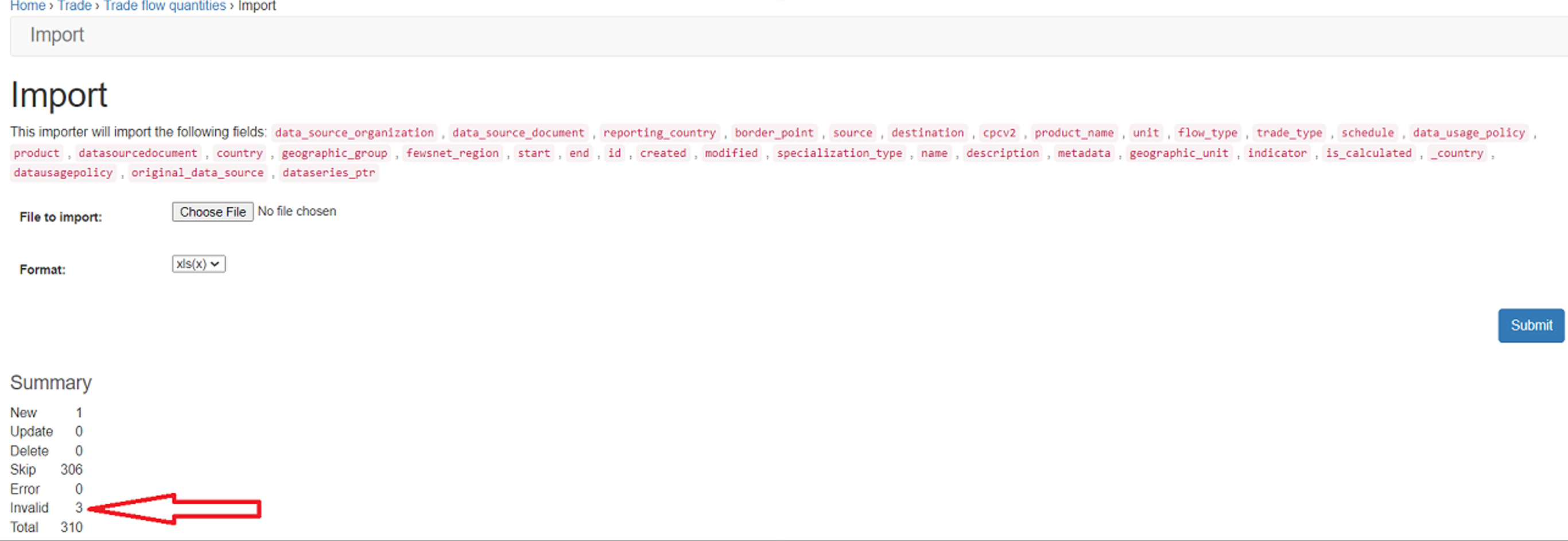
The import screen confirms the fields that will be imported and provides a summary of the new, skipped, and invalid records.

Explanation: The invalid results are caused by incompatible values across the flow_type, source_country, and destination_country fields. E.g., a flow_type value of export cannot be valid if the source_country and destination_country values are the same.

Solution: The values must be corrected to upload the data successfully.

Example 4: Extra character or value

Scenario: Uploading IPC data (https://fdw.fews.net/en/admin/warehouse/dataupload/add/) results in the following error message:

‘NoneType’ object is not iterable

Explanation: This error is caused by an extra character or value under the metadata columns. Solution: Removing the extra character or value will resolve the issue. You can use the TRIM function in Excel to remove extra spaces from text, leaving only a single space between words and no space characters at the start or end of the text.

Example 5: Metadata not in FDW

Scenario: Uploading price data from either the import screen (https://fdw.fews.net/en/admin/price/marketprice/import/) or data collection screen (https://fdw.fews.net/en/admin/warehouse/datacollection/add/) returns a skipped result:
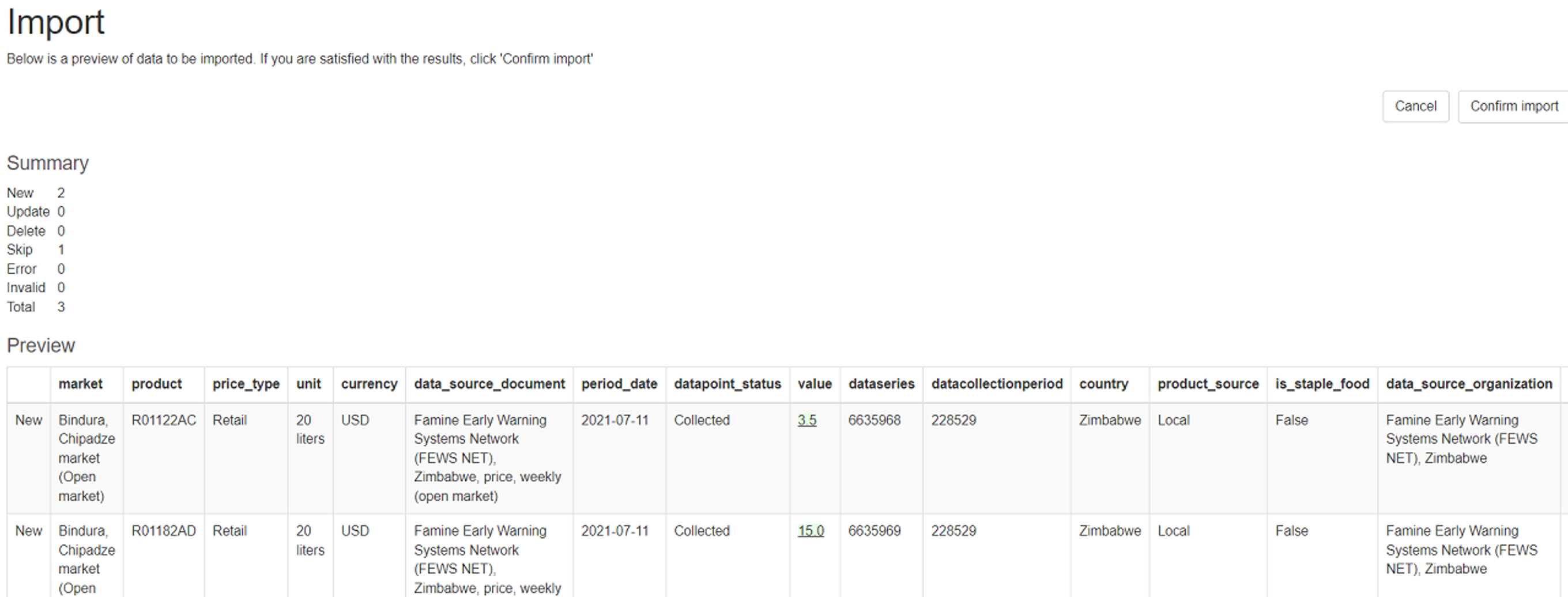
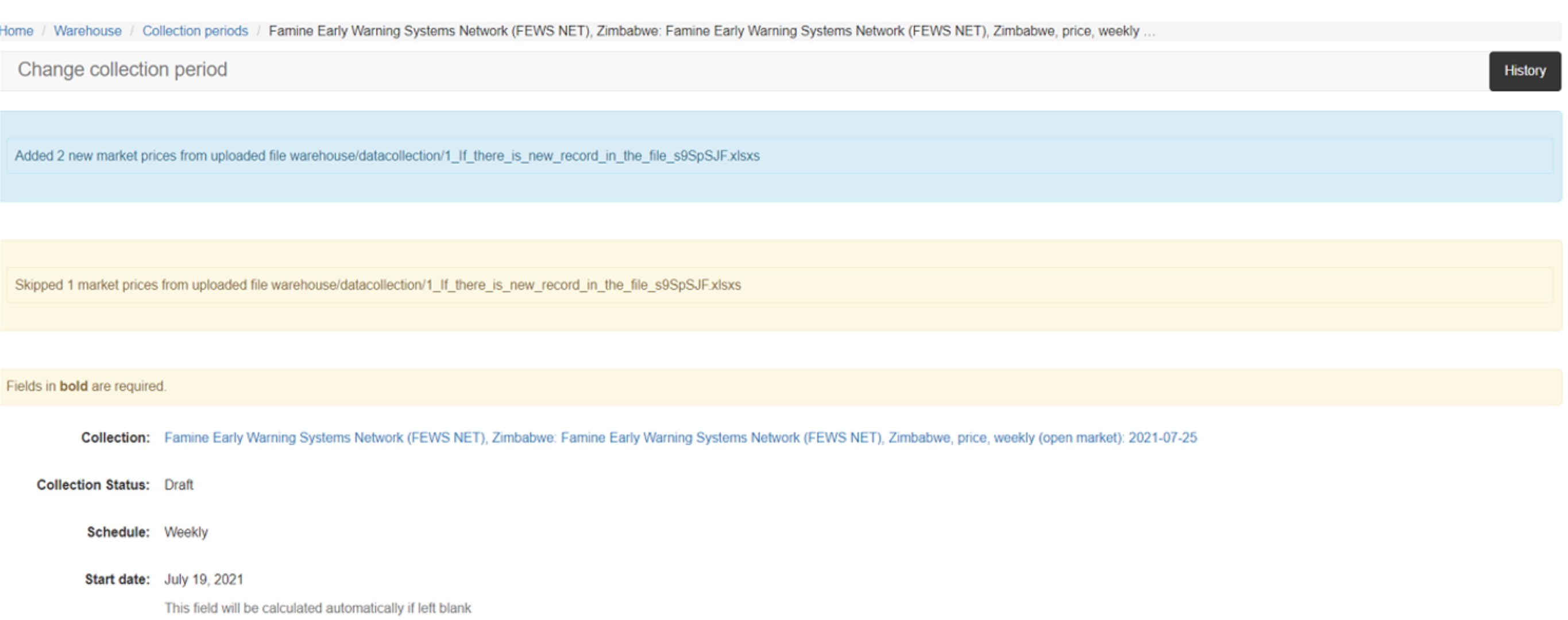
Import_price_skipped.png
An example of receiving a skipped result from the import screen.
Data_Collection_Price_skipped.png
An example of receiving a skipped result from the data collection screen.

Explanation: The file contains a new metadata record not in FDW.

Solution: Check for new metadata information that needs to be added through the data series or metadata importing screen before uploading the file again.
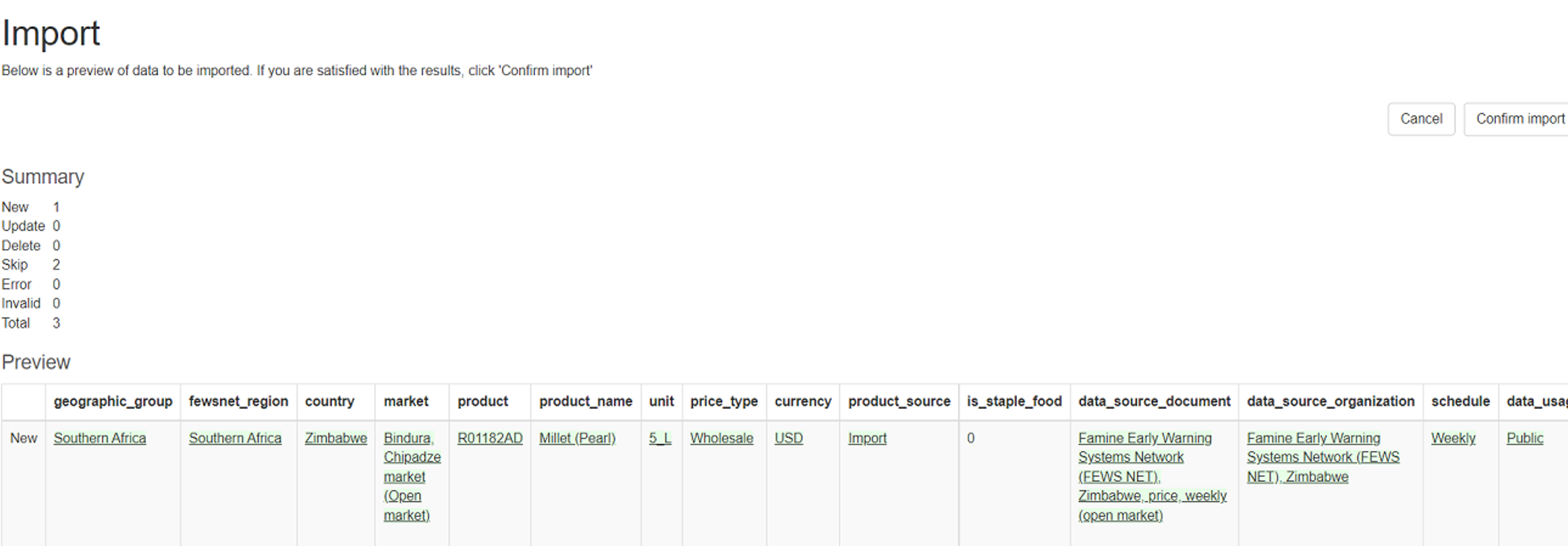
Import_skipped_metadata.png
An example of adding new metadata information on the Market Products Import screen. The preview screen shows one new record has been detected.

Data value errors

Data values must be accurately matched to their column headings and be within the expected range.

The examples below describe common errors related to data values:

Example 1: Data values do not match metadata

Scenario: Uploading price data from the data collection screen (https://fdw.fews.net/en/admin/warehouse/datacollection/add/) results in the following error message:

Error in 3 market prices from uploaded file warehouse/data collection/filename.xlsxs

Similarly, uploading the same file from the import screen (https://fdw.fews.net/en/admin/price/marketprice/import/) results in the following error message:

 ‘retail’

Explanation: The file contains interchanged data values for the price_type and product_source columns. As the data values could not be matched to the metadata fields in the column headings, they could not be uploaded.

Interchanged_data_values.png
An example of an error with interchanged values causing an error upon upload.

Solution: Correcting the file so the data values align with the correct metadata field will resolve the issue.

Example 2: Invalid data value

Scenario: Uploading AFIC data from the data collection screen https://fdw.fews.net/en/admin/warehouse/datacollection/add/) results in the following error messages:

1 invalid Acute Food Insecurity Phase from uploaded file warehouse/datacollection/test_UG2L-FNID_9hlZR0F.xlsx

Error in 635 Acute Food Insecurity Phases from uploaded file warehouse/datacollection/test_UG2L-FNID_9hlZR0F.xlsxs

Explanation: The file contains an invalid '0' value under the ML1 column. While a Data Collection was created from the upload attempt, it contains no Data Points.

Solution: Correcting the file to a valid value, e.g. '2' will resolve the issue. Delete the Data Collection with 0 Data Points, then select Add Data Collection and choose the corrected file.