
Seasonal calendar format
-
Use numbers to represent months. The month cells must be integers representing the month number. That means for the month of January use a
1, for February use a2, etc. The pipeline cannot recognize month names or abbreviations in this row. -
Ensure the same start month across the entire calendar. The start month for each village and for the results section must be the same, regardless of what month the village believes begins their consumption year. The Results columns will automatically calculate their values from the corresponding cell position within each community. That means the first cell in the Results range for a row will read the first cell from each of the villages. If half of the villages start from August (
8) and the other half starts in September (9), and the results section starts with9for September, then the Results column labeled9(the start month) will represent the values for August for some villages and September for other villages, leading to incorrect results. -
Use only 1s and blanks in the village columns. If data was collected in the villages, use the village fields to show this data. Use
1and not a character such as anx. -
Only add collected data in the village columns. If the Seasonal Calendar was developed during the analysis and reconciliation workshop (i.e., no village seasonal calendar data was collected), do not fill in the village fields. Only fill in the results fields.
Rowset format
For crops and animals the pipeline is designed to read a product (crop or animal) as the start of a rowset and attributes (land preparation, sowing, weeding, harvesting, heat, conceptions, births, milk production, peak sales, etc.) in subsequent rows below the product.
Example
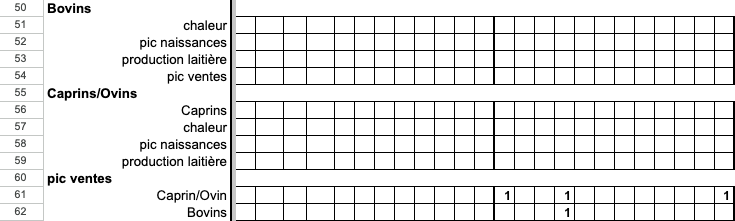
In this seasonal calendar, peak sales (pic ventes) for cattle (bovins) and goats/sheep (caprins/ovins) are recorded in rows 61-62. However, peak sales should be an attribute recorded under each product rowset. This means that data from lines 61 and 62 should be recorded under the Bovins and Caprins/Ovins rowsets. Edits might look as follows:
-
Remove row 60. The seasonal calendar pipeline cannot parse an attribute as a heading with products in rows below it.
-
Relabel row 61 to “pic ventes.” Without row 60, the pipeline will read data currently in row 61 if relabeled with the attribute “pic ventes” as the peak sales attribute for the rowset with the product label “Caprins/Ovins.”
-
Data from line 62 should be recorded in line 54. Row 62 should be removed.
The Caprins label for row 56 should also be removed as it is a product that will assign all subsequent attributes to goats instead of goats and sheep as intended by the primary label.
Marking key activities
To ensure that the seasonal calendar in the Livelihoods Explorer shows all key activities, those activities should be differentiated within the spreadsheet. The easiest way to do this is to add a column at the end of the spreadsheet (after the results column set) labeled Key activity. Use a “1” to mark rows that should appear in the seasonal calendar visualization.